

How to Accept Check Draft Payments from Customers?
Check draft payments offer a practical way for U.S. businesses to collect funds directly from a customer’s checking account without needing a signed paper check. Especially useful for phone payments, remote billing, and service-based industries, check drafts are legal, bank-approved, and fast when handled properly. In this guide, we’ll walk through the full process for accepting check draft payments—clearly and securely—so your business stays professional, compliant, and efficient.
Table of Contents: —
What Is a Check Draft?
A check draft (also known as a demand draft or bank draft) is a type of payment that allows a business to withdraw funds from a customer’s checking account with their verbal or written authorization. Unlike traditional checks, check drafts don’t require the customer to physically sign anything. Instead, the business prepares the check on behalf of the customer and submits it to the bank for deposit or processing. Check drafts are commonly used in:
- Collection agencies
- Utility companies
- Insurance payments
- Phone-based orders
- Legal and accounting firms, and many more
They’re especially popular when a customer isn’t physically present to write a check or when a credit card isn’t available.
Legal Foundation for a Check Draft: –
In the U.S., check drafts are governed by the Uniform Commercial Code (UCC) and Federal Reserve guidelines. As long as you obtain proper authorization from the customer, you are allowed to create a draft in their name and process the payment through the banking system.
The key requirements include:
- Clear authorization: Verbal (recorded) or written permission from the customer.
- Accurate account information: Routing number, account number, name, and payment amount.
- Proper formatting: The draft must look and function like a legitimate check.
Most banks will accept check drafts as long as these standards are met. However, failure to follow best practices can lead to disputes, chargebacks, or fraud claims.
Who Can Use a Check Draft?
Any U.S.-based business that offers services or sells products remotely can use check drafts, including:
- Medical and dental offices
- Online consultants
- B2B service providers
- Property managers
- Contractors and home service providers
If your business collects payments over the phone, by invoice, or remotely, check drafts offer a simple way to get paid without needing a card processor.
Process to Accept Check Draft Payments: —
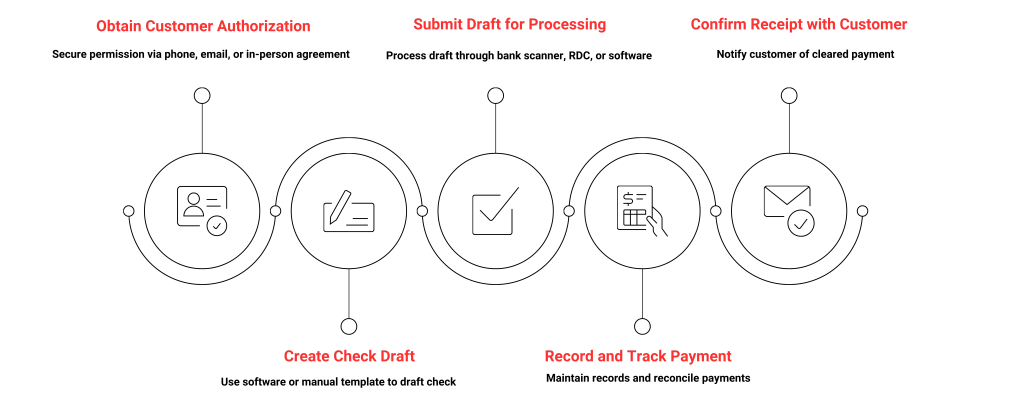
1. Get Authorization from the Customer:
Before drafting a check, you must obtain the customer’s permission. This can be:
- Over the phone (record the call if allowed by state law)
- Via email or online form
- In person with a signed agreement
Authorization must clearly include:
- Customer’s name
- Routing number
- Checking account number
- Payment amount and purpose
- Date of payment
Tip: Always document the authorization in writing or keep a digital recording. This protects your business if a customer disputes the transaction.
2. Create the Check Draft:
Use Check drafting software, your virtual terminal, or a manual template to create the draft. It should look like a regular check with the following details:
- Payee (your business name)
- Customer’s bank information
- Authorized amount
- Memo field (e.g., “Invoice #45678” or “Monthly service fee”)
- The words ‘No Signature Required’ in the signature line
Make sure the check format is compliant with your bank’s requirements. Most businesses use Check drafting platforms that auto-generate compliant formats.
3. Submit the Draft for Processing:
Once the draft is ready, you can process it in one of three ways:
- Print and deposit the check using a bank scanner
- Submit via RDC (Remote Deposit Capture)
- Upload through your bank or payment processor (if using software)
Some banks require physical copies; others accept scanned versions. Make sure to confirm your bank’s preferred method.
4. Record and Track the Payment:
Always keep a digital or physical copy of the draft, authorization, and confirmation. Use your accounting software or payment dashboard to track the payment and reconcile it against your records.
If the draft is returned due to NSF (non-sufficient funds) or account closure, you may be subject to fees. In this case, reach out to the customer promptly to resolve the issue and request another form of payment.
5. Confirm Receipt with the Customer:
It’s good practice to notify the customer once the payment has cleared. You can send:
- A payment receipt by email
- A confirmation message through your CRM
This step improves customer satisfaction and reinforces trust in your payment process.
Common Mistakes to Avoid: –
- Skipping authorization: Never process a draft without documented customer permission.
- Using incorrect account info: Double-check all routing and account numbers.
- Missing payment records: Always store proof of payment and authorization.
- Submitting to the wrong bank method: Verify whether your bank accepts digital vs. physical drafts.
Avoiding these errors reduces disputes and protects your business reputation.
Why Businesses Use a Check Draft: –
- No need for credit cards: Ideal when customers don’t use or trust card payments.
- Faster than mailing a check: Save days or even weeks.
- Lower fees than credit card processors: No interchange or swipe fees.
- Good for recurring or invoice payments: Especially when ACH is not set up.
For service-based U.S. businesses, check drafts remain a dependable way to get paid securely and on time.
Conclusion: —
Check draft gives U.S. businesses a powerful option for accepting payments quickly and remotely—especially when customers don’t have access to online portals or credit cards. By following a clear process that includes getting proper authorization, formatting your draft correctly, and submitting it securely, your business can confidently collect payments while staying compliant with U.S. banking laws.

 ChatGPT
 Grok
Grok Claude
 Perplexity
 Google Search